
If you hire a developer to perform small tweaks on your websites, they may need access to the admin area to edit or check something.
If you trust the developer, then you can create an administrator account for them and later delete it when they have done their job.
However, sometimes you may forget that you added someone with privileges to make changes on your website. This leaves your website open to possible security threats and data safety issues.
Using temporary, logins you can create temporary accounts that require no password to login and are automatically disabled after a given time.
Adding Temporary Login Accounts in WordPress
1. install Temporary Login Without Password plugin
2. visit Users » Temporary Logins page and click on ‘Create New’ button to add a new temporary login account.
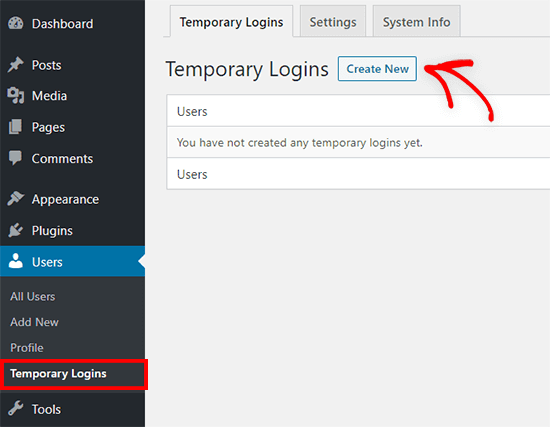
3. Submit the Required info and submit the form
Next, you need to select a user role for the user.
Then, you need to choose the expiry duration for this temporary account. This is the period after which the account will automatically expire.
Click on the ‘Click to Copy’ button to copy the URL and share it with anyone you want to have access.
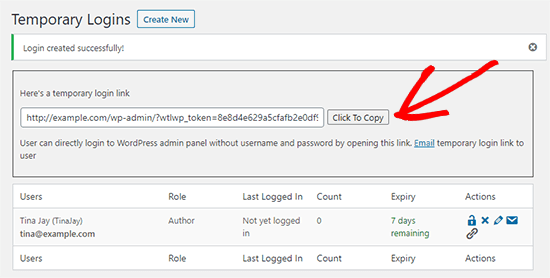
The temporary account will automatically expire after the time period you selected.