
An MX record tells where to deliver email that is sent to your domain.
If you are pointing your domain to a VPS or other service and want to use the email provided with your cPanel, you will have to set MX record to receive emails .
1/ login to your DNS Manager . If your nameserver is pointing to your cPanel, Log into your cPanel, navigate to Domains section > Zone Editor menu and Click Manage next to your domain
2/ Get the Shared IP Address , it is available in the right side column inside your cPanel.
3/ add an A record for your mail subdomain that points to the IP address
4/ add MX record that points to that subdomain
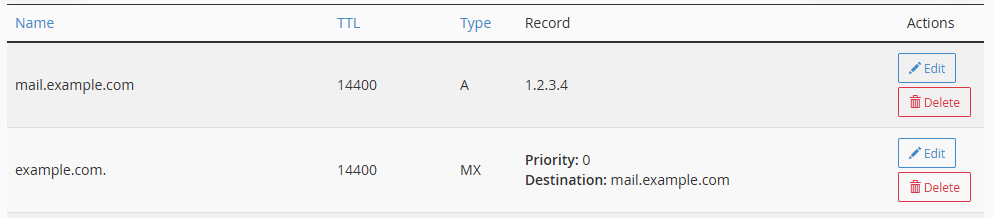
Make sure The Two Records You added look like the image above . replacing example.com with your own domain name , and 1.2.3.4 with your own shared IP .