
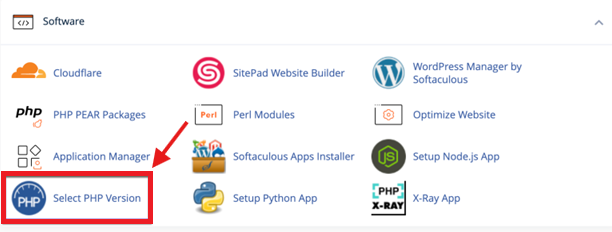
You control your own PHP settings. Everything in this guide is under one tool in cPanel, Select PHP Version, in the Software section. Changes apply straight away and you do not need to contact us.
On this page
Change the PHP version
- Open Select PHP Version.
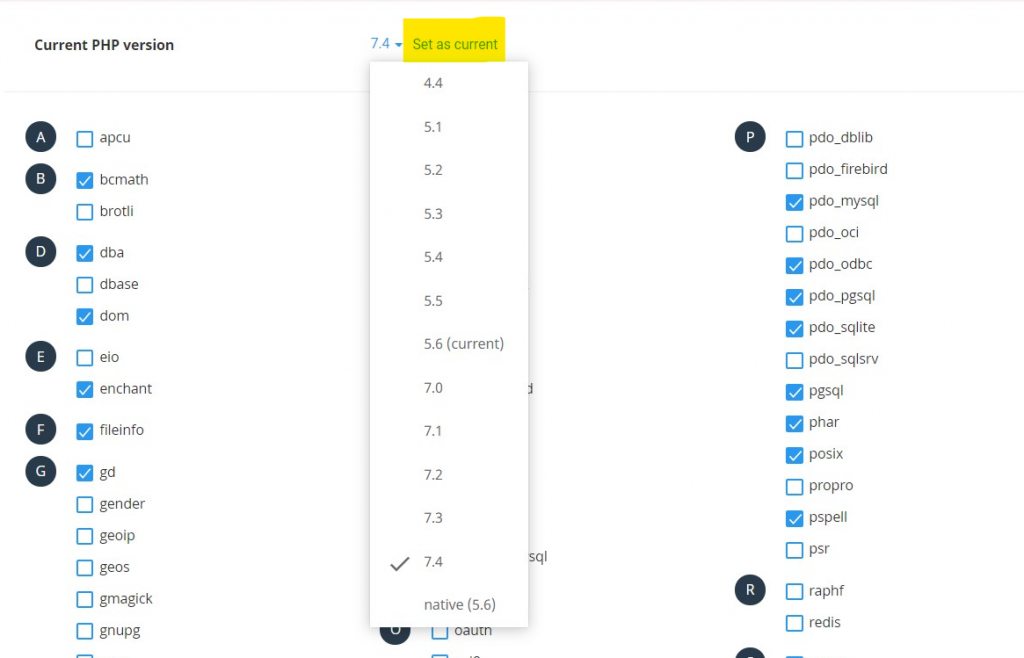
- Choose a version from the Current PHP version list.
- Click Set as current.
More screenshots are in How to Change Your PHP Version. If the site breaks after the change, switch back to the previous version: an old plugin or theme may not support the new one.
Turn extensions on or off
- In Select PHP Version, open the Extensions tab.
- Tick the extensions your site needs. Each tick is saved automatically.
📘 If the extension boxes cannot be changed
The version is set to “native”. Choose a numbered version first, click Set as current, then open the Extensions tab again.
Extensions that sites ask for most often:
| Site | Extensions |
|---|---|
| WordPress | mysqli or nd_mysqli (only one of the two), gd or imagick, zip, mbstring, curl, xml, intl |
| Laravel | pdo_mysql, mbstring, openssl, tokenizer, xml, ctype, fileinfo, bcmath |
The WordPress message “Your PHP installation appears to be missing the MySQL extension” means neither mysqli nor nd_mysqli is ticked.
Raise upload size, memory and time limits
In Select PHP Version, open the Options tab and change the value you need:
| Option | What it controls |
|---|---|
| upload_max_filesize | The largest single file you can upload |
| post_max_size | The largest form submission. Set it equal to or higher than upload_max_filesize. |
| memory_limit | Memory one PHP script may use |
| max_execution_time | How many seconds a script may run |
| max_input_vars | How many form fields are accepted, needed by large menus and page builders |
More screenshots are in How to Increase Maximum Upload File Size via cPanel.
Check what is active
In WordPress, go to Tools, then Site Health, then Info, and open Server. For any other site, create a file named info.php in public_html with the line below, open yourdomain.com/info.php, and delete the file when you are done.
<?php phpinfo();What these settings cannot change
PHP options work inside the limits of your hosting account. They do not raise the account’s own memory or its limit of 100 processes. See Resource Limits and Stuck Processes.
On Standard hosting (DirectAdmin)
Look for Select PHP Version in your DirectAdmin menu. It has the same version list, Extensions tab and Options tab. If you cannot find it, message us on Telegram with your domain name.
