
Every Yegara hosting account includes a free SSL certificate, which is what turns http:// into https:// and removes the “Not Secure” warning. This guide shows how to issue it and what to check when the warning stays.
On this page
How the free certificate works
- The certificate is installed automatically, usually within an hour or two of the account being created.
- It can only be issued once your domain points to your hosting. If you just registered the domain or changed its nameservers, wait for the change to take effect first.
- You can also issue it yourself at any time, as shown below.
Issue the certificate in cPanel
- In cPanel, go to Security and open SSL/TLS Status.
- Click Run AutoSSL and wait a few minutes.
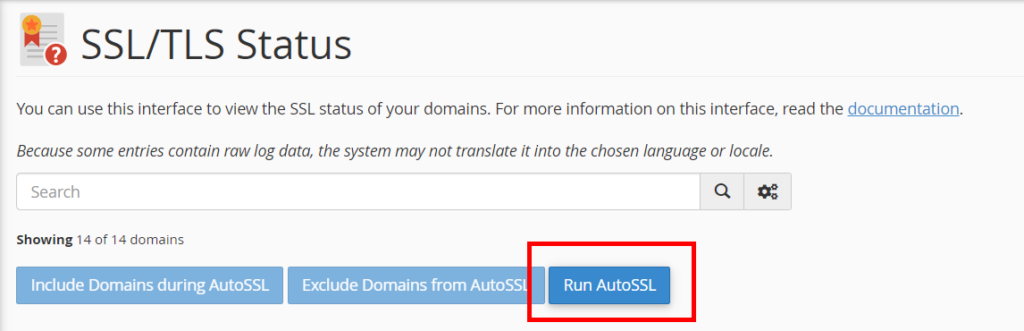
More screenshots are in How to Issue an SSL Certificate and Fix the “Not Secure” Warning.
Issue the certificate in DirectAdmin
- In DirectAdmin, open the SSL Certificates menu.
- Select Get automatic certificate from ACME Provider.
- Click Save and wait until it finishes.
Screenshots are in How to Issue SSL in DirectAdmin. The same steps apply to a free .pro.et site.
Make your site use HTTPS
A certificate alone does not redirect visitors. Once it is issued, force HTTPS in one of these ways:
- WordPress: under Settings, General, change both site addresses from http to https.
- cPanel: open Domains and turn on Force HTTPS Redirect for the domain.
- Any site: add a redirect rule to your
.htaccessfile.

The exact steps and the .htaccess code are in the “Not Secure” guide.
Still “Not Secure”? Check these
- You changed DNS or nameservers recently. The certificate cannot be issued until the domain points to your hosting everywhere. Wait for the change to spread, then issue it again.
- Your domain points somewhere else. If the A record points to another host, the certificate has to come from that host, not from us.
- You use Cloudflare. Cloudflare issues the certificate your visitors see, so cPanel does not issue an extra one. Check the SSL settings in Cloudflare.
- The page has a padlock warning but opens with https. Some images or scripts on the page are still loaded over http. Update those links to https.
- DirectAdmin keeps emailing you about a failed certificate renewal. Send us your domain name. This is usually a certificate setting we can correct for you.
Good to know
The included certificate is a standard domain-validated certificate. We do not offer organisation-validated (OV) or extended-validation (EV) certificates.
