

Every hosting account includes a free SSL certificate. If your site shows “Not secure”, you can issue the certificate yourself in DirectAdmin. It takes about a minute.
📘 Before you start
The certificate can only be issued when your domain already points to your hosting. If you changed the nameservers or DNS records recently, wait until the domain opens your site.
Issue the certificate
Step 1. In DirectAdmin, open the SSL Certificates menu.
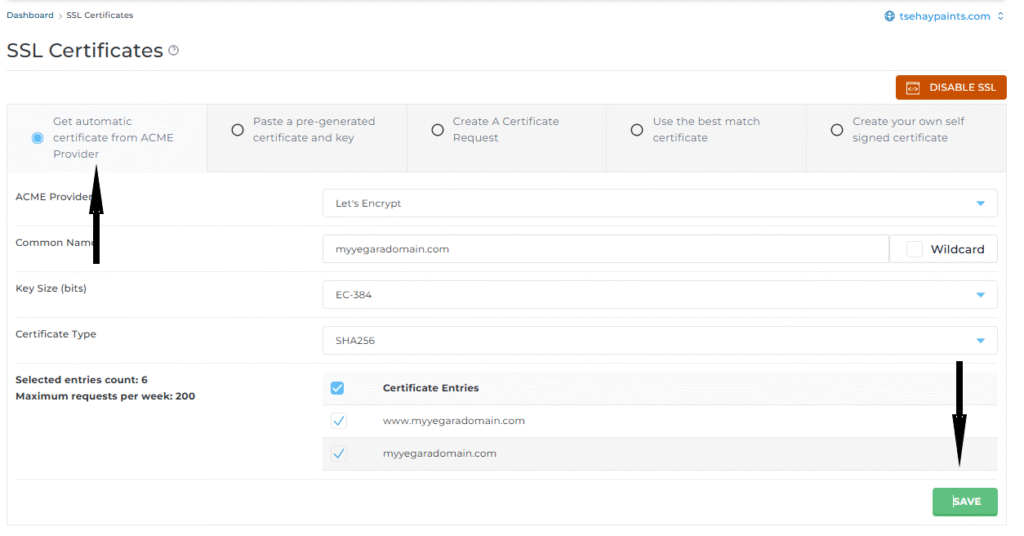
Step 2. Select Get automatic certificate from ACME Provider.
Step 3. Click Save.
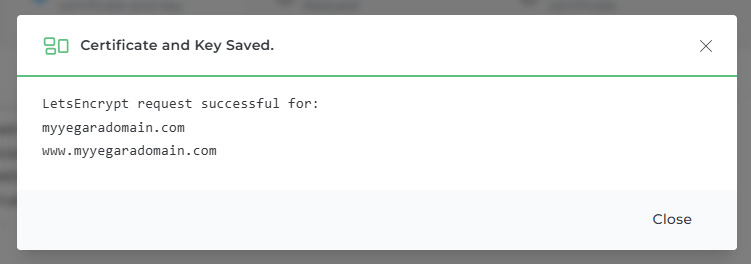
Step 4. Wait until DirectAdmin confirms that the certificate is saved.
Open your site with https:// in front of the address and check for the padlock.
If the certificate is not issued
The usual causes are a domain that does not point to your hosting yet, or the Cloudflare proxy standing in the way. The checks are in SSL and HTTPS: Get Your Free Certificate and Fix “Not Secure”.
