

dot ET is a country-level domain name of Ethiopia. it is expected that entities related to Ethiopia will use the .et domain extension, but there is no strict limit set for the domain to be used locally only.
Ethiotelecom Manages the .et registry and Below we will show you how you can register a .et domain name for yourself directly from Ethiotelecom.
1. Search for .et Domain
First, go to Ethiotelecoms portal by Visiting myportal.ethiotelecom.et
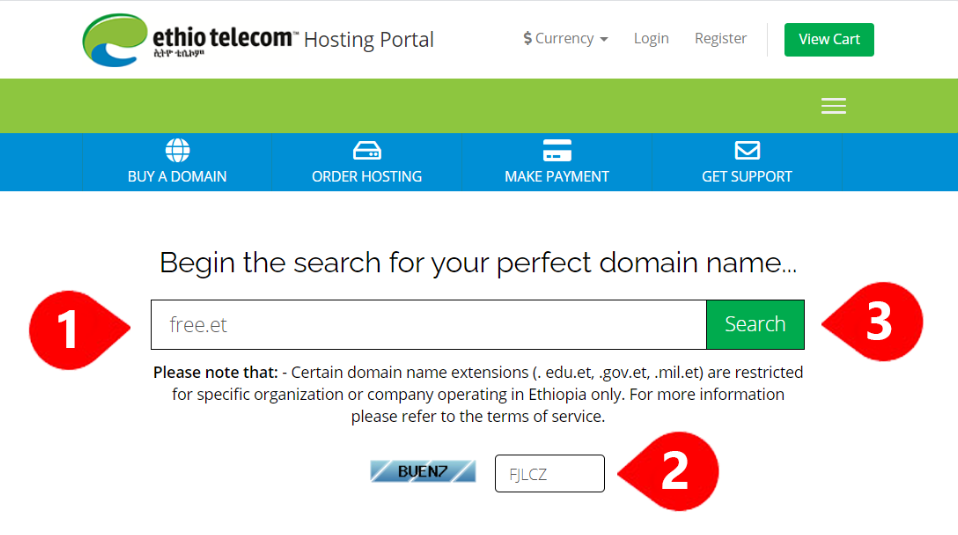
Then enter the Domain name you want to Register, here we are using free.et as an example. Then fill in the captcha form as shown and click on search
2. Add to Cart
If the domain you searched for is available , you will be presented with a message that says “Congratulations! free.et is available!” and more variations options for you to pick if you are interested. this include Second level domain like .com.et , .net.et or .org.et and more
Now Click on “Add to cart” next to the domain name you want to own

3. Go to Cart
When You add the domain to cart, The button will change to Checkout. Click on that or you can use the menu button at the top that says View Cart if you are buying multiple domains.

4. Set Name Server (optional)
To connect your Domain name with your cpanel Hosting at Yegara host or any other provider like GoDaddy or Bluehost, you will need to set the domain nameserver. you can do that now which will save you time or you can do that later by following this Guide: How to Update Your .et Domain Nameserver you bought from Ethiotelecom!
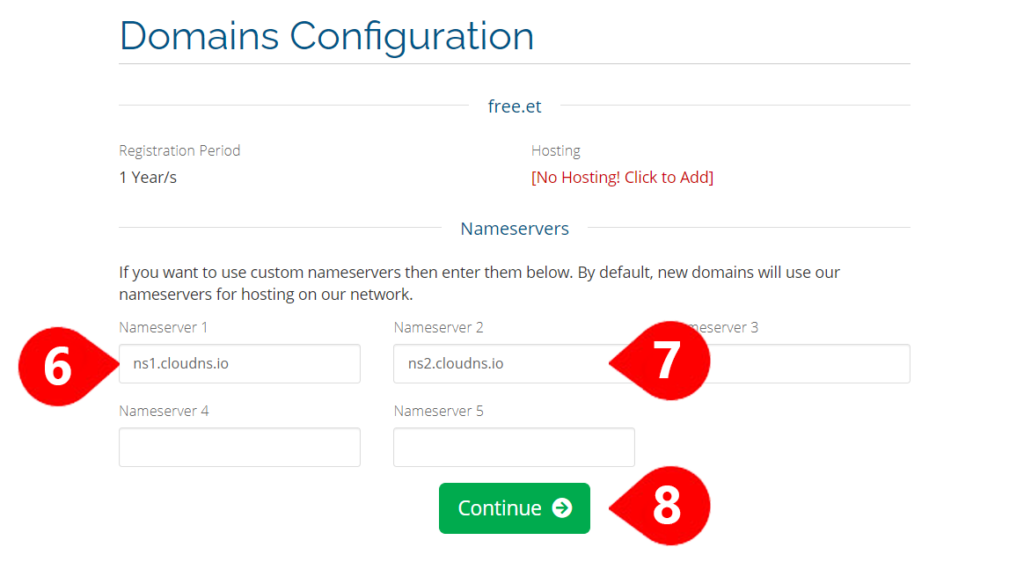
Use one of the nameservers below if you plan to use your domain with Yegara Host.
ns1.cloudns.io
ns2.cloudns.io
ns1.clouduk.pro
ns2.clouduk.pro
5. Review Your Order
Review your order and click on the checkout Button

6. Checkout
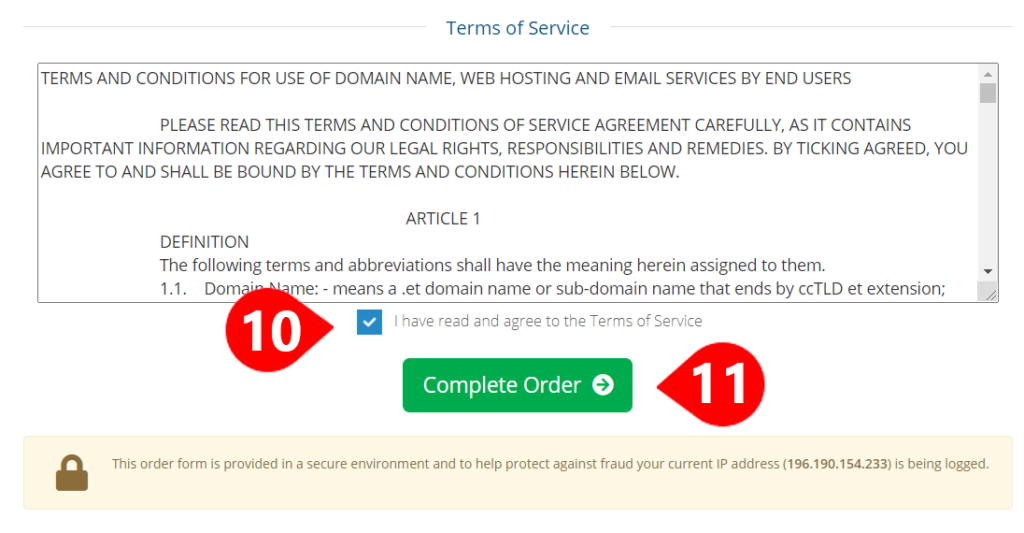
Now provide All the required information, making sure your email and Phone number are correct. Then scroll Down at the button and tick on “I have read and agree to the Terms of Service” and click Complete Order.
7. Make the Payment
When you complete your order, Ethiotelecom sends you an Email and SMS containing your Invoice Number and Their CBE Bank Account. At the time of writing this, their CBE bank account is 8888, yes it is 8888.
If you have Mobile banking you can use that to transfer the exact amount or you can go to the bank and make a cash deposit.
NOTE: Make sure To Write Your Invoice ID in The Reason Feild or Bank Form

You are Done. Depending On the date and Time of Your Payment They will activate your Domain within Hours. If for some reason your order is delayed wait for 24-48 hours and reach out to 994.
If you are looking to get Hosting For The domain you just purchased, you can get Unlimited Cpanel Hosting from Yegara, Just follow this link: https://yegara.com/host
If you have any questions or need help, leave a comment below or get in touch with us. we will be happy to help.
Please note that: – Certain domain name extensions (. edu.et, .gov.et, .mil.et) are restricted to specific organizations or companies operating in Ethiopia only.


Leave a Reply