

If your domain is registered at another company, you can move it to Yegara HOST and manage the domain, your website and your emails in one place. Here is how the transfer works, step by step.
On this page
Transfer, or just point the domain?
There are two ways to use a domain you already own with us:
- Transfer it: the registration of the domain moves to Yegara, so you renew the domain and the hosting in one place. This guide covers the transfer.
- Point it only: the domain stays at its current registrar and only the hosting is with us. See Use a Domain Bought Elsewhere with Yegara Hosting.
Before you start
Check that your domain can be transferred:
- It was registered or last transferred more than 60 days ago.
- It is not expired or about to expire. We recommend starting the transfer at least 2 weeks before the domain expires.
- You can log in to your account at the current registrar, to unlock the domain and get its EPP code.
- The Whois email address of the domain is current, because the transfer is authorized through that address.
📘 A transfer adds one year
Each domain transfer extends your domain registration by one year.
Step 1: Unlock your domain
Log in to your account at your current registrar and turn off the domain lock, also called transfer lock or registrar lock. A locked domain cannot be transferred.
Step 2: Get the EPP code
The EPP code, also called Auth code or authorization code, is a password for your domain. It shows that the owner of the domain approved the transfer.
Most registrars let you copy or generate the code in your account. If you cannot find it there, ask their support for it. Keep the code private and keep it ready: you enter it on the order form in the next step.
Step 3: Start the transfer
- Open the order page.
- Click Transfer Domain. The page opens with Register Domain selected, so make sure you switch.
- Type your domain name, choose the extension and click CONTINUE.

- When the page says your domain is available to transfer, type your code in the EPP CODE field and click CONTINUE.
- Finish the order.
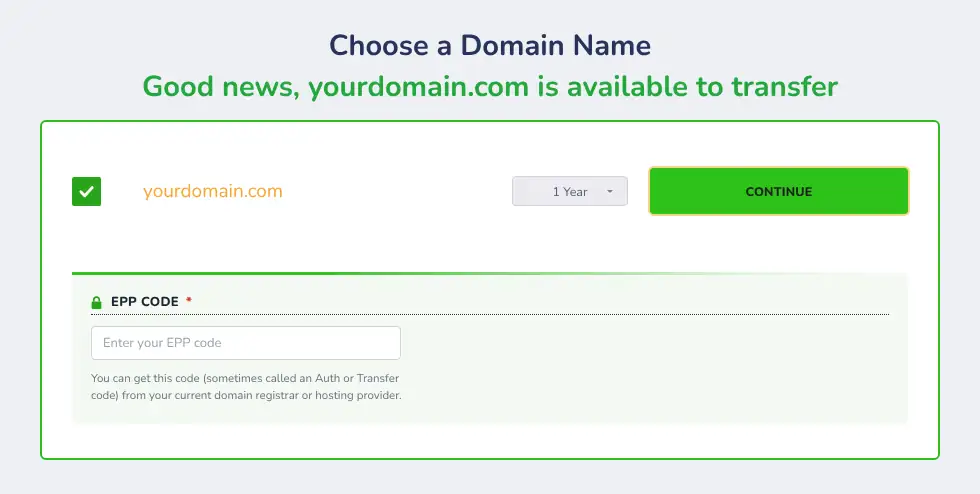
The other order steps are described in How to Buy a Domain Name and Web Hosting from Yegara HOST.
Step 4: Pay and confirm
You receive an SMS and an email with your invoice link. Pay by Telebirr or CBE and submit your transaction number on the invoice page. See How to Confirm Your Payment.
Step 5: Wait for the transfer
A transfer usually takes up to 5 days to complete. During this time:
- Watch the inbox of the domain’s Whois email address. The transfer is authorized through that address.
- Your domain keeps its current nameservers, so your website and emails keep working where they are hosted now.
- The nameservers cannot be changed until the transfer is complete.
If the transfer is still not complete after 5 days, message us on Telegram with the domain name and we will check it.
Step 6: Move your website and emails
The transfer moves the domain only. Your website and emails stay at your old hosting until you move them.
- Log in to your Yegara control panel with the server link in your account details email. See After You Pay: Activation and Login Details.
- Copy your website files. See How to Upload Your Website Files to cPanel Using File Manager and FTP.
- Copy your mailboxes. See How to Copy Email Accounts from One cPanel to Another.
- When everything is in place and the transfer is complete, change the domain’s nameservers to the ones of your Yegara hosting. See How to Update Your Nameservers.
📘 Keep your old hosting until you are done
Do not cancel your old hosting before your website and emails are copied and the domain points to your Yegara hosting.
Need help copying your data? Message us on Telegram.
Can I transfer a .et domain?
No. Domains ending in .et, such as .com.et and .edu.et, are managed only by Ethio Telecom and cannot be transferred to us. You can still host the website with us: keep the domain at Ethio Telecom and point it to your hosting. See Use a Domain Bought Elsewhere with Yegara Hosting.
